

Brilliant Directories
Business Directory Database: Everything You Need to Know
Brilliant Directories 10 min read Brilliant Directories In today’s digital landscape, organizing and accessing business information efficiently is crucial for companies aiming to enhance their online presence and connect with potential clients. A business directory database serves as a centralized repository, systematically cataloging businesses based on various criteria such as industry, location, and services offered. Platforms like Brilliant Directories have revolutionized the creation and management of these databases, offering user-friendly solutions that streamline the process. In this comprehensive guide, we’ll delve into the essentials of business directory databases, explore the benefits of using Brilliant Directories, provide a step-by-step setup guide, address common management challenges, and share best practices to maintain an effective and profitable directory. Here’s a concise and mobile-friendly summary table to visually recap the core elements of your blog: “Business Directory Database: Everything You Need to Know”. This helps both users and search engines scan key points easily, improving UX, SEO, and AIO optimization. Quick Summary: Business Directory Database at a Glance Topic Key Points Definition A centralized database that organizes business listings by category, location, and service. Platform Highlight Brilliant Directories – All-in-one tool for building and managing online directories with ease. Benefits of Brilliant Directories Customization, scalability, advanced search, user-friendly dashboard, and instant business data import. Setup Steps 1. Choose template2. Customize fields3. Import listings4. Set categories/locations5. Configure search6. Publish and promote Common Issues Outdated data, duplicate listings, inconsistent formats, poor navigation Solutions Schedule audits, use deduplication tools, standardize fields, improve UI/UX Best Practices Regular updates, SEO optimization, user feedback, secure hosting, mobile responsiveness Monetization Methods Paid listings, ads, lead generation, membership tiers SEO Optimization Tips Use keyword-rich titles, clear URLs, fast load speed, structured content, and reviews Advanced Capabilities Supports multilingual directories, custom member dashboards, user analytics, and content moderation Ideal For Entrepreneurs, local business networks, B2B directories, niche industry platforms What is a Business Directory Database? A business directory database is an organized collection of business listings, systematically arranged to facilitate easy access to information about companies within specific categories. These directories can be categorized by niche, location, activity, or size, and typically include details such as business names, addresses, contact information, and services offered. The primary purpose of such databases is to connect users with relevant businesses, enhancing visibility and fostering connections within the industry. Online business directories have become increasingly popular, providing dynamic and searchable platforms that benefit both businesses and consumers. Build a Smarter Business Directory—Faster Launch with Brilliant Directories Today Benefits of Using Brilliant Directories for Business Databases Brilliant Directories offers a robust platform for creating and managing business directory databases, providing several advantages: Customization: Tailor your directory to align with your brand identity and meet specific business needs without extensive coding knowledge. citeturn0search35 Scalability: Efficiently manage a growing number of listings, ensuring the platform evolves alongside your business expansion. Advanced Search Options: Enhance user experience with sophisticated search functionalities, enabling users to find relevant businesses quickly. User-Friendly Interface: Simplify the management process with an intuitive dashboard, making it accessible for users with varying technical expertise. Instant Business Data: Quickly populate your directory with business listings based on category and location, providing an immediate content boost and enhancing credibility. citeturn0search1 These features collectively contribute to creating a professional and efficient business directory that can enhance user engagement and satisfaction. How to Set Up a Business Directory Database Setting up a business directory database using Brilliant Directories involves the following steps: Select a Template: Choose from a range of pre-designed themes that best fit your directory’s purpose and aesthetic preferences. citeturn0search35 Customize Fields: Define and customize the fields to capture relevant business information, ensuring the directory meets your specific requirements. Import Data: Utilize Brilliant Directories’ tools to import business data seamlessly, either manually or through automated processes. Set Up Categories and Locations: Organize listings by creating appropriate categories and location filters to enhance navigability. Configure Search Functionality: Implement advanced search options to allow users to find listings based on various criteria. Publish and Promote: Once the directory is set up, publish it and employ marketing strategies to attract users and businesses to your platform. Brilliant Directories provides comprehensive support and resources to guide you through each step, ensuring a smooth setup process. Your Directory, Your Rules—Customize Everything Start Your Free Setup Guide Now Common Problems and Solutions for Managing Databases Managing a business directory database can present several challenges: Outdated Listings: Regularly update business information to maintain accuracy and reliability. Implementing automated reminders for businesses to verify their details can help keep the data current. Duplicate Entries: Duplicates can clutter the database and confuse users. Regular audits and deduplication tools can help identify and remove redundant listings. Navigation Issues: A complex or unintuitive navigation structure can deter users. Simplify the user interface and ensure categories and search functions are straightforward and user-friendly. Data Inconsistency: Inconsistent data formats can lead to confusion and errors. Standardize data entry protocols to maintain uniformity across all listings. Addressing these issues proactively ensures a seamless experience for users and enhances the credibility of your directory. Best Practices for Maintaining a Business Directory Database To ensure the longevity and effectiveness of your business directory database, consider the following best practices: Regular Updates: Schedule periodic reviews of listings to verify and update business information, maintaining the accuracy and relevance of your directory. User Feedback Integration: Encourage users to report inaccuracies or suggest improvements, fostering a collaborative approach to data accuracy. SEO Optimization: Optimize your directory for search engines by using relevant keywords, meta descriptions, and ensuring mobile responsiveness to enhance visibility. Data Security Measures: Implement robust security protocols to protect sensitive information and comply with data protection regulations. Performance Monitoring: Regularly monitor the directory’s performance metrics to identify areas for improvement and ensure optimal functionality. Adhering to these practices will help maintain a high-quality, user-friendly, and trustworthy business directory. Your Directory, Perfectly Organized in Minutes! Build a powerful business directory with smart search, clean layouts, and scalable features—no coding required. Let’s Build It FAQs About Business Directory

Company Directory Template for Brilliant Directories: A Comprehensive Guide
Brilliant Directories 10 min read Brilliant Directories Have you ever visited a business directory site that felt more confusing than helpful? Maybe it took too long to find a specific company or the listings looked outdated and generic. You’re not alone. Building a successful company directory is more than just listing businesses — it’s about creating an intuitive, scalable experience that connects users with the right information fast. That’s exactly why Brilliant Directories has become the go-to platform for entrepreneurs, agencies, and business owners who want to launch professional directories without drowning in code or complexity. In this guide, we’ll unpack what a company directory template really is, why Brilliant Directories makes this process easier, how to build your own, and what mistakes to avoid. If you want a directory that’s clean, customizable, mobile-ready, and optimized for growth, this is for you. What is a Company Directory Template? A company directory template is essentially a structured layout that organizes how business listings are displayed on a directory website. Think of it as the blueprint for your entire directory’s look, feel, and functionality. Whether you’re building a niche directory for local service providers or a global B2B portal, a well-designed template does the heavy lifting. It determines: How company profiles appear (logos, descriptions, contact info) How users search and filter listings The structure of category pages and detail views Brilliant Directories simplifies this process by offering plug-and-play templates that can be customized visually. Unlike DIY or headless CMS setups, you don’t need to piece together the backend — everything is built for speed, SEO, and user experience right out of the box. Looking to see real-world examples? Explore our live Brilliant Directories projects What Are the Benefits of Using Brilliant Directories Templates? Brilliant Directories is purpose-built for directory websites. Here’s why it stands out when it comes to company directory templates: Built-in SEO Optimization Each template is structured for maximum search visibility. You get schema markup, clean URLs, and meta controls without installing extra plugins. Point-and-Click Customization From color schemes to profile layout changes, you can customize everything through the admin panel. No developer required. Powerful Search + Filter Tools Let users search by name, industry, location, or custom tags. Advanced filtering is built-in — just enable it. Scalable Membership + Monetization Want to charge businesses for featured listings or leads? Brilliant Directories has flexible pricing tiers, lead forms, and automated workflows ready to go. Mobile-First, Always With over 65% of traffic coming from mobile, your directory needs to look great on all screens. Templates are responsive and lightweight. How to Create a Company Directory in Brilliant Directories Let’s break this down into actionable steps. Even if you’re not tech-savvy, you’ll be surprised at how streamlined this process can be. Choose a Pre-Built TemplateLog into your Brilliant Directories dashboard and select a directory template that aligns with your niche (e.g., legal, medical, B2B). Define Your Business CategoriesOrganize listings under logical categories and subcategories to improve navigation and SEO. Customize Listing FieldsDecide what data each business should provide — logos, descriptions, locations, service areas, hours, etc. Use the Form Manager to edit fields. Add Listings Manually or Import via CSVYou can add business profiles one by one or bulk import using a spreadsheet template. Enable Search FiltersTurn on filters such as “Location,” “Industry,” or “Rating” to help users refine their search. Launch and PromoteOnce listings are in, publish your directory and start driving traffic through email, social, or paid ads Pro Tip: Integrate Google Analytics and heatmaps to monitor user engagement. Want help setting it up? Check out our setup services. Common Issues and Solutions for Company Directories Even with a great platform like Brilliant Directories, you might run into roadblocks. Here are the most common ones — and how to solve them. Listings Look Cluttered Solution: Use the Layout Editor to simplify what’s visible. Limit each listing to 3-4 key data points for better scanning. Users Can’t Find What They’re Looking For Solution: Add keyword-based search, set relevant filters, and ensure categories are logically structured. Poor SEO Performance Solution: Use unique titles/descriptions for listings, link internally between category and blog pages, and submit a sitemap via Google Search Console. Low Engagement or Bounce Rate Solution: Add call-to-action buttons like “Contact Business,” enable reviews, and consider highlighting featured listings. Best Practices for Designing a Company Directory A beautiful directory isn’t just about colors — it’s about clarity, usability, and performance. Here’s how to get it right: Use whitespace and clean grids to prevent visual overload Make your CTAs clear (“Get Quote,” “Visit Website”) Ensure your template is mobile-optimized Compress images and use lazy loading for faster load times Highlight top-rated or featured companies to guide user clicks Looking to upgrade your UX? See our UI/UX design tips for directories Future-Proofing: What’s Next for Directory Templates? Thinking beyond launch, here are some powerful upgrades you can plan for: Add a blog or resource hub to support SEO and keep users engaged Enable messaging between users and companies via private inbox Offer dynamic ads or sponsored placements for monetization Track user activity with heatmaps or engagement analytics Integrate third-party review tools like Trustpilot or Google Reviews As more users shift toward mobile-first discovery, your directory’s design and performance can make or break its success. Conclusion: Ready to Build Your Directory Website? A well-structured company directory isn’t just a list — it’s a powerful business tool. Whether you’re launching a local business network, an industry-specific portal, or a nationwide B2B platform, using a strong template inside Brilliant Directories sets you up for long-term success. By focusing on clear structure, seamless UX, and strong SEO foundations, you’re not just building pages — you’re building value. Let’s Build Something Great Together Have questions or want expert help designing your Brilliant Directories site? Contact our team for a free strategy session Explore Our Portfolio FAQs What is a company directory template used for? It structures how business listings are displayed, helping users find companies easily. Why choose

How to Build a Directory Website (Step-by-Step Guide)
Brilliant Directories 10 min read Brilliant Directories A professionally built directory website is one of the most powerful means of organizing and listing businesses, professionals, or niche services. Be it building a local listing website, a membership business directory, or a paid business directory, you need a systematic approach to it all. Building a directory website is one of the primary services of Metaviz. Here is how you can effectively build a directory site. “A successful directory website is more than just listings. It’s about user experience, seamless navigation, and strategic monetization. Whether you’re building a local listing website, a membership business directory, or a paid business directory, you need a systematic approach.” Zain Ali Co-Founder & CTO Summary of Key Information Section Key Takeaways What Is a Directory Website? A structured platform listing businesses, professionals, or services for users to search and find relevant information. Why Build a Directory Website? Improves business visibility, generates leads, and allows monetization through paid listings and memberships. Step-by-Step Process to Build a Directory Website 1. Choose a niche and research market demand. 2. Select a platform (WordPress, Weebly, or custom-built). 3. Design a user-friendly interface. 4. Add categorized listings with detailed content. 5. Optimize for SEO to increase traffic. Common Problems & Solutions Slow Website Speed → Optimize images & use CDN. Lack of Listings → Offer free trials or incentives. Poor SEO → Use structured data, keyword optimization. How Much Does It Cost to Build a Directory? Domain & Hosting: $50-$200/year Website Builder Subscription: $100-$500/year Premium Plugins/Themes: $50-$300 Custom Development: $500-$5,000+ Best Practices for a Successful Directory Website Regularly update listings, engage users with reviews, offer paid features for monetization, and optimize for mobile use. FAQs Covers SEO tips, monetization methods, best platforms, maintenance costs, and ways to attract more listings. Launch Your Directory Website with Confidence! Book Free Strategy Call What Is a Directory Website and Why Build One? A listing website is a structured online platform where users can find categorized listings. It can serve as a business directory, a local business listing, or a niche-based listing site. These websites benefit businesses by improving visibility, providing valuable leads, and enabling monetization through paid listings or memberships. Popular directories like Yelp and Yellow Pages generate revenue by offering premium placements and ad space. Step-by-Step Process to Build a Directory Website Building a web listing directory requires strategic planning and the right tools. Below is a detailed process to create a successful directory site. Step 1: Choose Your Niche and Market Selecting a profitable niche is essential when learning how to build a business directory or listing website. A successful directory focuses on industries with high demand and low competition. Consider factors like: Market demand for specific directory listings Potential monetization strategies (ads, premium listings) Existing competition in top directories Step 2: Select a Platform for Your Web Directory Choosing the right directory site builder impacts your website’s success. Some of the best options include: WordPress: Ideal for those who want flexibility and control over their best listing platforms. Weebly: A beginner-friendly platform for those wondering how to build a directory web on Weebly with simple drag-and-drop features. Step 3: Design Your Listing Website An effective directory site should have a user-friendly interface, clear navigation, and a mobile-responsive layout. Key design considerations include: An intuitive search and filter function A visually appealing homepage with categorized listings A simple yet engaging user submission form for new listings Step 4: Add Listings and Content A web listing directory requires well-structured and detailed listings. To ensure high-quality content: Use clear and engaging descriptions for each listing Categorize businesses properly for easy navigation Incorporate user reviews and ratings to enhance credibility Step 5: Optimize for SEO SEO plays a crucial role in making your web directory visible in search engines. Essential SEO practices include: Using relevant keywords like what is a listing website and how to build a directory or listing website with WordPress Optimizing meta descriptions and title tags for better search rankings Creating high-quality blog content related to your directory niche Common Problems When Building a Web Directory and Their Solutions Many developers face issues when figuring out how to build a local directory or listing website. Here are common problems and their solutions: Slow Website Speed: Optimize images and make use of a content delivery network. Lack of Listings: Offer free listings initially to attract users and businesses. Poor SEO Performance: Pay attention to keyword research and the highest quality backlinks. How Much Does It Cost to Build a Web Directory? The cost of building a web directory is based on both the choice of platform and the features. Estimated expenses include: Domain & Hosting: Approximately $50-$200 per year Website Builder Subscription: More or less $100-$500 annually Premium Plugins or Themes: Almost $50-$300 one-time or annual fees Custom Development (if needed): Moreover, less than $500-$5,000 Understanding how much it costs to build a directory or listing website helps in budgeting for long-term success. Best Practices for Running a Successful Directory Website To ensure your directory website thrives, follow these best practices: Regularly Update Listings: Keep information accurate and up to date. Engage Users: Encourage user reviews and social sharing. Monetization Strategies: Offer featured listings and membership options. Turn Your Idea into a Live Directory Site Today! Start Your Project Now Conclusion: Is Building a Directory Website Worth the Effort? Learning how to build a paid business directory website requires effort, but it offers long-term revenue potential. If you’re looking to create a profitable web listing directory, investing time in research, platform selection, and SEO will ensure success. Need Help Building Your Directory Website? Contact Us Today! Metaviz specializes in directory site builder solutions, helping businesses create the best directory websites. If you need expert guidance on how to build a directory site, reach out to us today! Your directory idea deserves a strong foundation! Get in touch with us to plan and build a powerful, scalable directory website tailored to your niche.
Reliable Ongoing Directory Support
“We’ve been working with Metaviz for over a year for ongoing directory site maintenance. Anytime we need updates or new features, they’re quick and efficient. They’ve helped us improve performance, add user functionality, and fix bugs within hours. What stands out is their commitment to getting things done right. It’s great to have a dependable partner for our platform.”
Smooth Migration & Customization
“Switching platforms is stressful, but Metaviz made our move to Brilliant Directories easy. They customized everything from the layout to member dashboards and got it done fast. We appreciated the way they communicated each step of the process. They even handled our SEO redirects which saved us a headache. Top-quality service and a team that genuinely knows what they’re doing.”
Directory Site Setup
“We needed a complete overhaul of our business directory, and Metaviz delivered better than we imagined. They handled setup, customization, and even integrated a few unique features we requested. Support was consistent, communication was top-notch, and the final product looked clean and professional. Thanks to their work, our site now loads faster and is getting more user signups. Highly recommended for any Brilliant Directories project.”

Best Divorce Attorney Network
We developed Best Divorce Attorney, an online directory that helps individuals find top-rated divorce attorneys through a trusted and searchable network. This platform simplifies the process of connecting clients with experienced legal professionals, ensuring they receive the best legal support during challenging times.

Austin Business Woman Network
We developed Austin Business Women, a professional networking platform that combines an online directory, digital visibility, and in-person events to empower women entrepreneurs. The platform provides relationship-building programs that help members expand their businesses while fostering personal growth.
AE Freelance
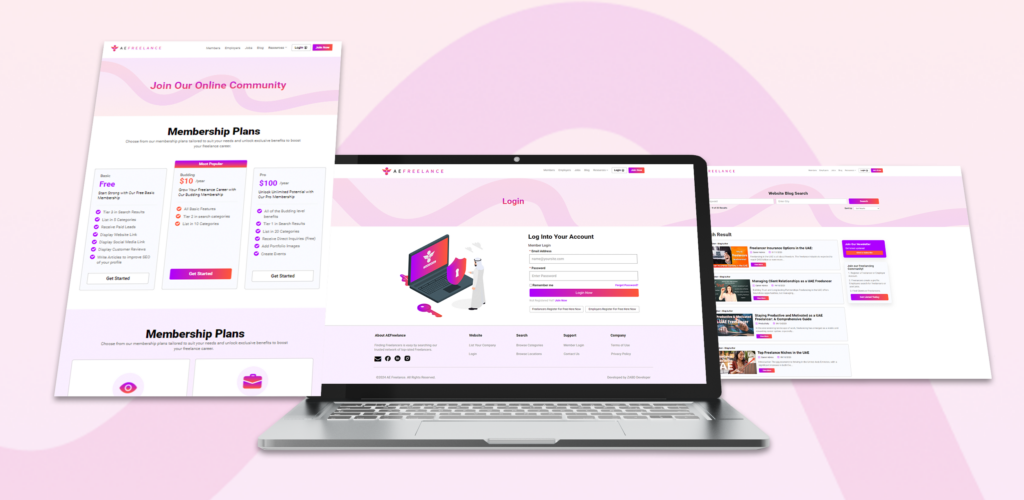
We developed AEFreelance.com, a dynamic freelancing directory tailored for the UAE market. The platform enables freelancers to create profiles, showcase their skills, and apply for jobs, while companies can sign up, post job opportunities, and search for skilled professionals. The website operates on a monthly/yearly subscription model for both freelancers and employers, ensuring a sustainable revenue stream.